JWT Authentication in Node.js Explained Simply
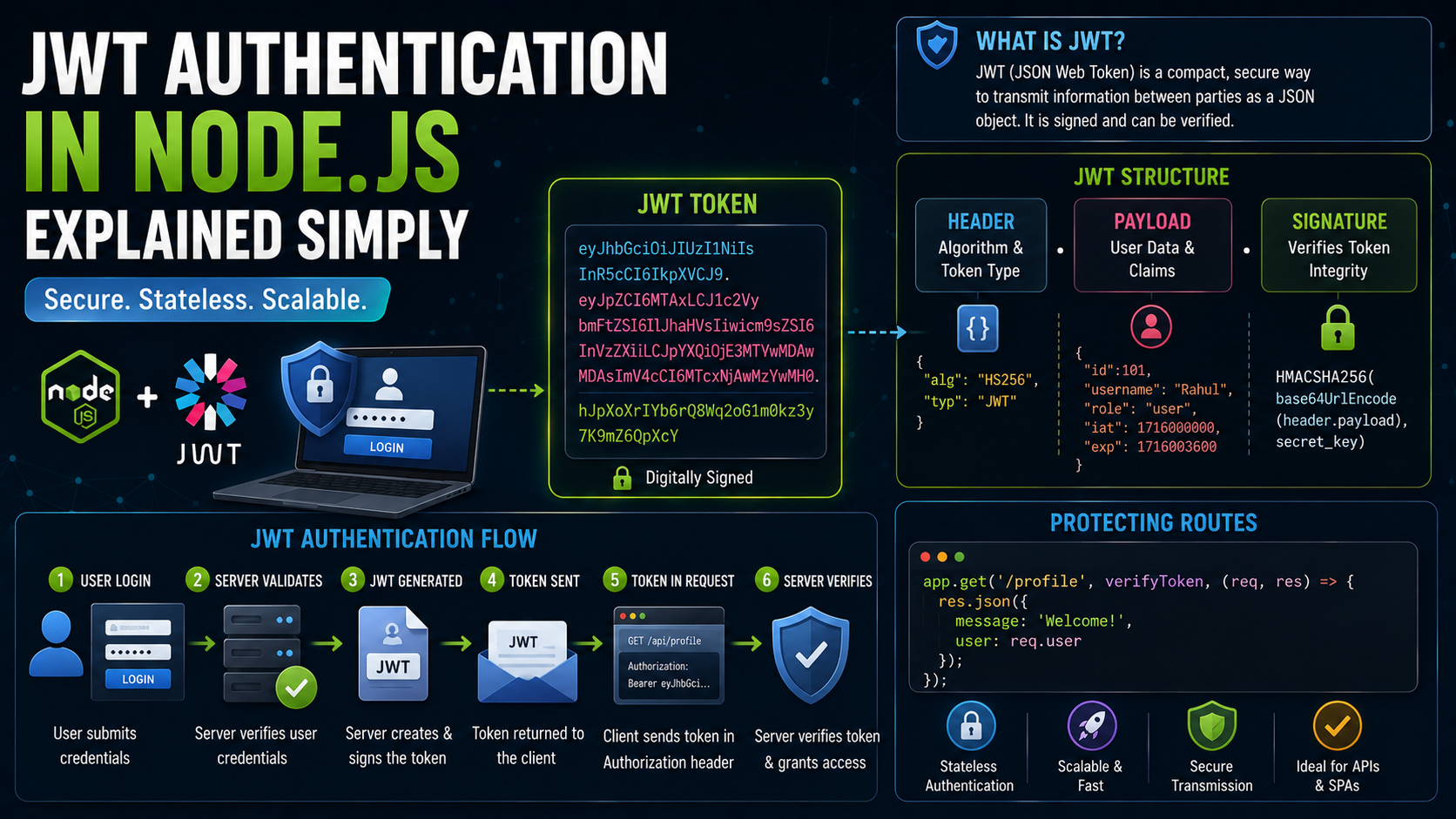
Introduction
Imagine entering a concert stadium.
At the entrance, security asks:
“Do you have a valid ticket?”
You show your ticket.
Security checks it.
Then allows you inside.
Now imagine security asking you for your password every 10 seconds while you’re already inside the stadium.
Absolutely exhausting.
That’s why systems need a smarter way to identify users after login.
And that’s exactly what:
JWT Authentication
does.
JWT allows servers to verify users using:
Tokens
instead of repeatedly asking for login credentials.
Modern applications use JWT everywhere:
login systems
APIs
mobile apps
authentication systems
protected routes
In this guide, you’ll learn:
what authentication means
what JWT is
JWT structure
login flow using JWT
sending tokens with requests
protecting routes using tokens
Let’s enter the concert.
What Authentication Means
Authentication means:
Verifying who the user is
Example:
username + password
Google login
OTP verification
Authentication answers the question:
"Are you really who you claim to be?"
Very important for secure applications.
Why Authentication Is Required
Without authentication:
anyone could access accounts
private data becomes exposed
systems become unsafe
Imagine social media apps without login systems.
Absolute chaos.
Someone would rename your profile picture to potato within minutes.
Authentication protects users and applications.
Traditional Session Authentication Problem
Older systems often stored sessions on server.
Server had to remember every logged-in user.
Works fine initially.
But scaling becomes harder as users grow.
That’s where:
JWT
became popular.
What Is JWT?
JWT stands for:
JSON Web Token
It is basically:
A digitally signed token containing user information
After login:
server creates token
sends token to client
client sends token with future requests
Instead of storing login sessions heavily on server.
Stateless Authentication Explained Simply
JWT uses:
Stateless authentication
Meaning:
Server doesn't need to remember logged-in users manually
The token itself carries authentication information.
Think of JWT like a movie ticket.
The theatre staff doesn’t remember every visitor personally.
They simply verify ticket validity.
Very efficient system.
Real-Life Analogy
Username + Password
Showing ID at entrance.
JWT Token
Temporary access pass.
Protected Route
VIP section requiring valid pass.
Simple mental model.
Structure of a JWT
A JWT contains three parts:
Header.Payload.Signature
Example:
xxxxx.yyyyy.zzzzz
Each section has specific purpose.
JWT Structure Visual


1. Header
The header contains:
token type
signing algorithm
Example:
{
  "alg": "HS256",
  "typ": "JWT"
}
Very small metadata section.
2. Payload
Payload contains actual data.
Examples:
user ID
username
role
Example:
{
  "id": 101,
  "name": "Rahul"
}
Important:
Payload is NOT encrypted
Anyone can decode it.
Never store passwords inside JWT payload.
Ever.
Please.
3. Signature
Signature verifies token authenticity.
It prevents tampering.
If someone modifies payload:
Signature becomes invalid
Server immediately detects manipulation.
Very important security mechanism.
How JWT Login Flow Works
Let’s understand the full process step-by-step.
Step 1: User Logs In
User sends:
email + password
to server.
Step 2: Server Verifies Credentials
If credentials correct:
JWT token generated
Step 3: Token Sent to Client
Server returns token.
Example:
{
  "token": "eyJhbGciOi..."
}
Step 4: Client Stores Token
Usually stored in:
localStorage
cookies
memory
Step 5: Client Sends Token with Requests
Future requests include token.
Step 6: Server Validates Token
If token valid:
Access granted
Otherwise:
Access denied
That’s the core JWT authentication lifecycle.
JWT Login Authentication Flow


Creating JWT in Node.js
Install package:
npm install jsonwebtoken
Generating Token
Example:
const jwt = require("jsonwebtoken");

const token = jwt.sign(
  { id: 101 },
  "secretKey"
);

console.log(token);
Understanding This Code
Payload
{ id: 101 }
stored inside token.
Secret Key
"secretKey"
used for signature generation.
jwt.sign()
creates JWT token.
Simple enough.
Sending Token with Requests
Clients usually send token inside:
Authorization header
Example:
Authorization: Bearer TOKEN_HERE
This is standard JWT practice.
Example Request
fetch("/profile", {
  headers: {
    Authorization: `Bearer ${token}`
  }
});
Now server can verify user identity.
Protecting Routes Using Tokens
Protected routes require valid token.
Example:
app.get("/dashboard", verifyToken, (req, res) => {

  res.send("Welcome");

});
Middleware checks token before route executes.
Very common Express pattern.
Token Validation Lifecycle


Verifying JWT Token
Example middleware:
const jwt = require("jsonwebtoken");

function verifyToken(req, res, next) {

  const token = req.headers.authorization;

  if(!token) {
    return res.send("Access Denied");
  }

  try {

    jwt.verify(token, "secretKey");

    next();

  } catch(error) {

    res.send("Invalid Token");

  }

}
What Happens Here
No Token
Access denied.
Invalid Token
Request blocked.
Valid Token
Request continues safely.
Middleware acts like security guard checking passes.
Why JWT Became Popular
JWT became extremely popular because it is:
stateless
scalable
fast
flexible
API-friendly
Especially useful for:
mobile apps
frontend-backend separation
microservices
REST APIs
Important Beginner Clarification
JWT itself does NOT store users automatically.
The token only proves identity.
Applications still usually have database storing:
users
passwords
roles
JWT simply helps verify authenticated users efficiently.
Common Beginner Mistake
Many beginners store sensitive data inside payload.
Example:
{
  "password": "123456"
}
Very unsafe.
Remember:
JWT payload can be decoded easily
Never store secrets there.
Another Common Mistake
Using extremely weak secret keys.
Example:
"123"
Not good.
Use strong environment variables in real applications.
Real-Life Analogy Recap
Login
Showing ID.
JWT
Getting entry pass.
Protected Route
VIP area requiring valid pass.
Token Verification
Security checking pass authenticity.
Very intuitive mental model.
Why Middleware Works Perfectly with JWT
JWT authentication is commonly implemented using:
Middleware
because every protected request needs validation before reaching route handlers.
Middleware becomes security checkpoint.
Very elegant architecture.
Unique Tip for Beginners
Whenever learning JWT, always mentally separate:
Authentication
from:
Authorization
Authentication
“Who are you?”
Authorization
“What are you allowed to access?”
That distinction becomes extremely important later.
Final Thoughts
JWT authentication provides a scalable and efficient way to verify users in Node.js applications.
Instead of storing session data heavily on server, JWT uses signed tokens that clients send with requests.
At a high level:
user logs in
server generates token
client stores token
token sent with requests
server verifies authenticity
Using:
headers
middleware
token validation
applications can protect routes securely and efficiently.
And once you understand JWT as simply a secure access pass, authentication systems suddenly become far less intimidating.