Creating Routes and Handling Requests with Express
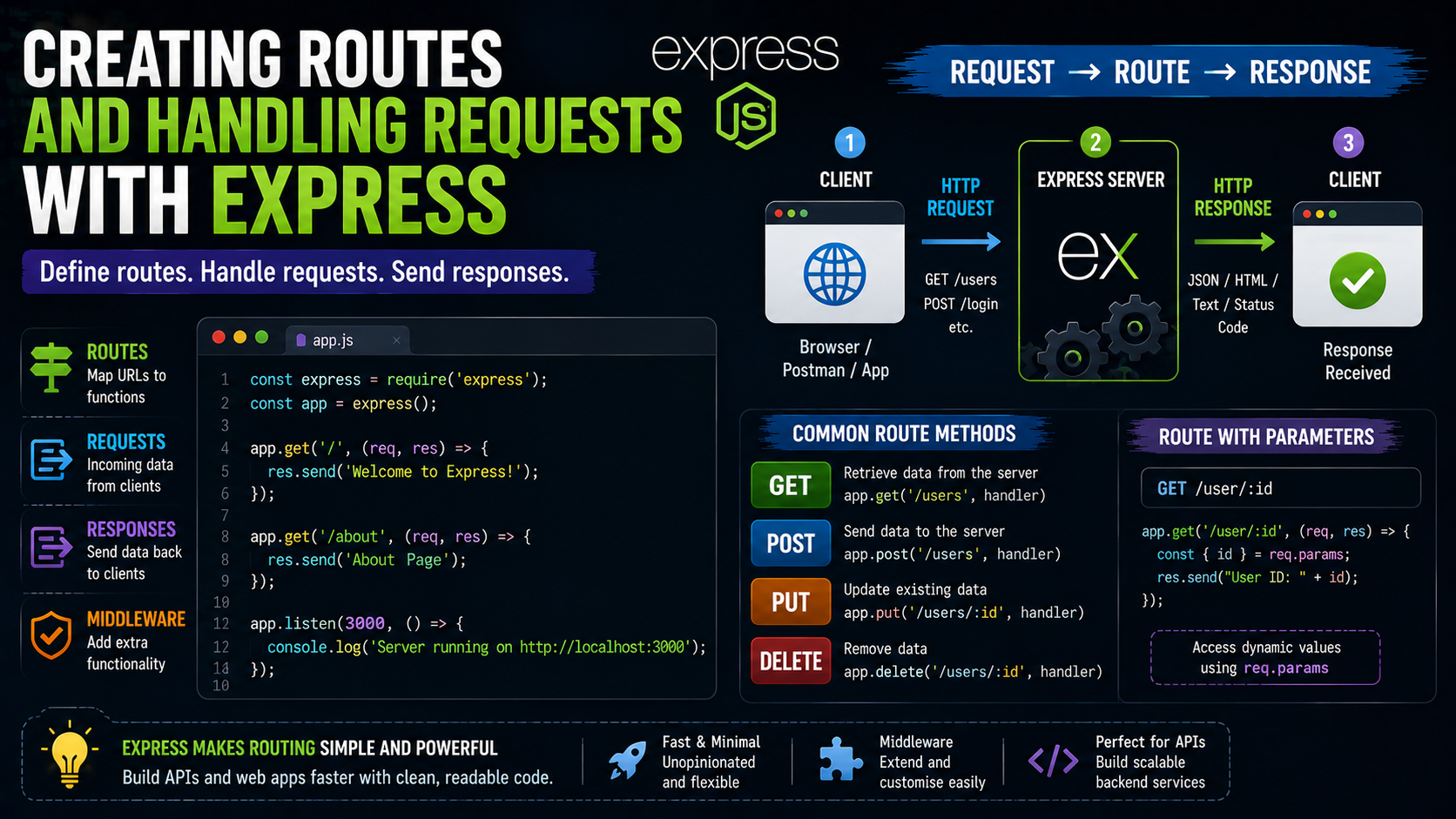
Introduction
Imagine you walk into a huge shopping mall.
You see signs everywhere:
Food Court → 2nd Floor
Cinema → Left Side
Gaming Zone → Straight Ahead
Exit → Hopefully somewhere nearby
Without these directions, the mall would become complete chaos.
People looking for pizza would accidentally end up buying mattresses.
Children searching for arcade games would somehow arrive at tax consultancy offices.
That’s exactly why:
Routes
exist in web applications.
Routes tell your server:
“If someone requests this URL, send them here.”
And in the Node.js world, one of the easiest ways to create routes is using:
Express.js
Express makes server routing simple, clean, and beginner-friendly.
In this guide, you’ll learn:
what routes are
how Express handles requests
creating GET routes
handling POST requests
route parameters
request and response objects
Let’s organise the shopping mall.
What Is Express.js?
Express.js is a:
Minimal web framework for Node.js
It helps developers build:
servers
APIs
routes
backend applications
Without Express, creating routes in Node.js feels more complicated.
Express simplifies everything dramatically.
Think of Express like adding GPS navigation to your backend application.
What Are Routes?
Routes define:
How the server responds to specific requests
Example:
/home
/about
/contact
/products
Each route points to different functionality.
Just like different doors inside a building.
Real-Life Analogy
Route
A road leading to a destination.
Request
A user asking for something.
Response
The server replying back.
Simple.
Very practical.
Very internet.
Installing Express
Before creating routes, install Express.
Step 1: Create Project Folder
Example:
express-app
Step 2: Initialize Project
Run:
npm init -y
This creates:
package.json
Node project configuration file.
Step 3: Install Express
Run:
npm install express
Done.
Express installed successfully.
Minimal emotional damage involved.
Creating Your First Express Server
Create file:
app.js
Add:
const express = require("express");

const app = express();

app.listen(3000, () => {
  console.log("Server running");
});
Understanding This Code
Import Express
require("express")
loads Express library.
Create App
const app = express();
creates Express application.
Start Server
app.listen(3000)
starts server on port 3000.
Running the Server
In terminal:
node app.js
Output:
Server running
Server is now alive.
Tiny.
But alive.
What Is a Request?
A request happens when client asks server for something.
Examples:
opening webpage
sending form
requesting API data
Think of requests like customers placing food orders.
What Is a Response?
A response is what server sends back.
Examples:
HTML page
JSON data
message
image
Server listens.
Then responds.
Very conversational relationship.
Basic Route Example
Express creates routes using methods like:
app.get()
Example:
app.get("/", (req, res) => {

  res.send("Welcome Home");

});
Understanding This Route
"/"
Represents homepage route.
req
Request object.
Contains client information.
res
Response object.
Used to send data back.
res.send()
Sends response to client.
Complete Example
const express = require("express");

const app = express();

app.get("/", (req, res) => {

  res.send("Welcome Home");

});

app.listen(3000, () => {

  console.log("Server running");

});
Visit:
http://localhost:3000
Output:
Welcome Home
Congratulations.
You officially created your first Express route.
Route Handling Flow


Creating Multiple Routes
Example:
app.get("/about", (req, res) => {

  res.send("About Page");

});

app.get("/contact", (req, res) => {

  res.send("Contact Page");

});
Now different URLs return different responses.
Exactly like rooms inside a building.
HTTP Methods in Express
Express supports multiple request types.
GET
Used for fetching data.
Example:
app.get()
POST
Used for sending data.
Example:
app.post()
PUT
Used for updating data.
DELETE
Used for removing data.
Restaurant Analogy
GET
“Show me menu.”
POST
“Place my order.”
PUT
“Change my order.”
DELETE
“Cancel my order.”
Very memorable.
Very beginner-friendly.
Handling POST Requests
Example:
app.post("/login", (req, res) => {

  res.send("Login Successful");

});
This route responds only to POST requests.
Not GET requests.
That distinction matters.
Understanding req Object
The request object contains useful information.
Examples:
req.params
req.query
req.body
It represents everything client sends.
Think of it like delivery information arriving with a package.
Understanding res Object
The response object controls server replies.
Examples:
res.send()
res.json()
res.status()
Used constantly in Express applications.
Sending JSON Response
Example:
app.get("/user", (req, res) => {

  res.json({
    name: "Rahul",
    age: 25
  });

});
Output:
{
  "name": "Rahul",
  "age": 25
}
Very common for APIs.
Route Parameters
Sometimes routes need dynamic values.
Example:
app.get("/user/:id", (req, res) => {

  res.send(req.params.id);

});
Visit:
/user/101
Output:
101
Understanding Route Parameters
:id
acts like placeholder.
Express extracts value automatically.
Very useful for:
user IDs
product IDs
blog IDs
Dynamic Route Example
app.get("/product/:name", (req, res) => {

  res.send("Product: " + req.params.name);

});
Visit:
/product/laptop
Output:
Product: laptop
Dynamic routing unlocked.
Request → Route → Response Flow


Why Express Became Popular
Developers loved Express because it:
simplified routing
reduced boilerplate code
handled requests elegantly
worked perfectly with Node.js
Without Express:
Servers require much more manual setup.
Express made backend development dramatically faster.
Common Beginner Mistake
Many beginners forget to restart server after changing code.
Result:
Why isn't anything updating?!
Very common.
Very relatable.
Very frustrating initially.
Another Common Mistake
Using wrong route method.
Example:
app.get("/login")
while sending POST request.
Route won’t match.
Always check:
GET vs POST
carefully.
Real-Life Analogy Recap
Route
Road leading somewhere.
Request
Customer asking for something.
Response
Server replying.
Express
Traffic controller organising everything.
Simple mental model.
Huge clarity improvement.
Unique Tip for Beginners
When learning Express, start by creating tiny routes first.
Example:
/hello
/about
/contact
Small experiments build confidence much faster than giant complicated projects immediately.
Final Thoughts
Express.js makes creating routes and handling requests incredibly simple for beginners.
By using methods like:
app.get()app.post()reqres
developers can quickly build backend applications and APIs.
At a high level:
routes define paths
requests ask for data
responses send results back
And once you understand that request-response cycle, backend development suddenly feels much less mysterious and much more approachable.