The new Keyword in JavaScript
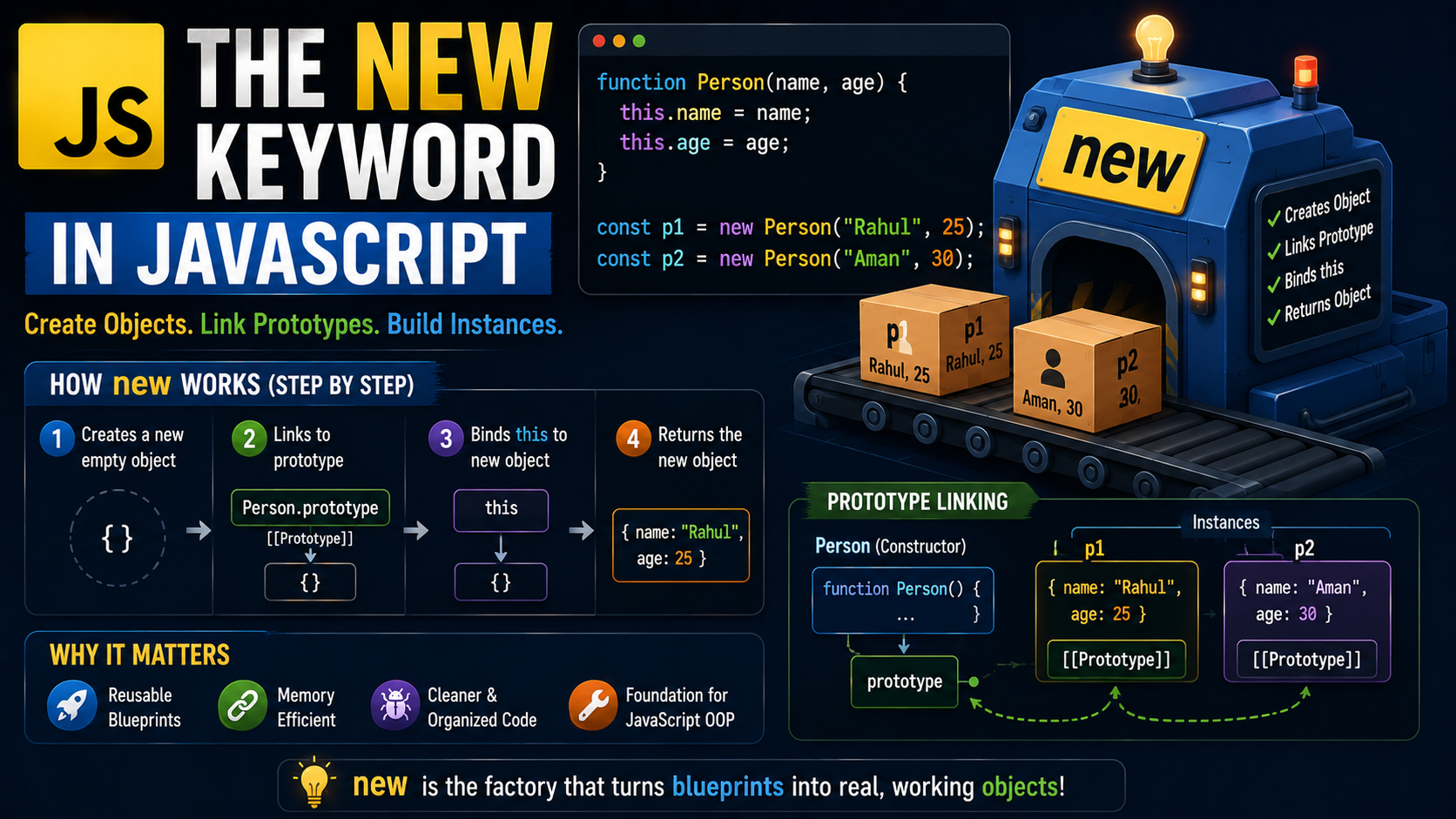
Introduction
Imagine you walk into a car factory.
Inside the factory is a blueprint called:
Car
But the blueprint itself is not a real car.
You cannot drive a blueprint to the grocery store.
You cannot impress anyone by saying:
“Look at my beautiful PDF blueprint.”
The blueprint only describes how cars should be built.
To create an actual car, the factory needs to produce:
a real object
with properties
connected to shared features
That factory process is basically what the:
new keyword
does in JavaScript.
The new keyword helps JavaScript create objects from constructor functions.
And under the hood, several important things happen automatically.
In this guide, you’ll learn:
what the
newkeyword doesconstructor functions
how object creation works step by step
prototype linking
instances created from constructors
Let’s build some cars.
What Is the new Keyword?
The new keyword is used to:
Create objects from constructor functions
Example:
function Car(name) {

  this.name = name;

}

const car1 = new Car("BMW");
Here:
new Car("BMW")
creates a brand-new object.
Without new, the constructor function behaves like a normal function.
And things can become very weird very quickly.
Understanding Constructor Functions
A constructor function is simply:
A function used to create objects
By convention, constructor function names start with capital letters.
Example:
function Person(name, age) {

  this.name = name;
  this.age = age;

}
This function acts like a blueprint.
Creating Instances
Using new:
const user1 = new Person("Rahul", 25);

const user2 = new Person("Aman", 30);
Output:
Different objects created from same constructor
Think of it like cookie cutters.
One cutter.
Many cookies.
Hopefully delicious cookies.
Constructor → Instance Creation Flow


What the new Keyword Actually Does
This is the most important part.
When JavaScript sees:
new Person("Rahul", 25)
it performs several hidden steps automatically.
Step 1: Creates a New Empty Object
JavaScript secretly creates:
{}
an empty object.
Step 2: Links Prototype
The new object gets linked to:
Person.prototype
This enables prototype inheritance.
We’ll simplify this shortly.
No panic required.
Step 3: this Points to New Object
Inside constructor:
this
now refers to the newly created object.
So:
this.name = name
adds properties onto that object.
Step 4: Object Gets Returned Automatically
Finally:
new object returned
without needing explicit return.
Very convenient.
Very magical-looking.
Very JavaScript.
Visualising the Process
new Person("Rahul")

↓

1. Create {}
2. Link prototype
3. Bind this
4. Return object
That’s the entire process conceptually.
Simple Constructor Example
function Student(name, course) {

  this.name = name;
  this.course = course;

}

const student1 = new Student("Riya", "JavaScript");

console.log(student1);
Output:
{
  name: "Riya",
  course: "JavaScript"
}
Very clean.
Very reusable.
Very factory-like.
Why Constructors Are Useful
Without constructors:
const user1 = {
  name: "Rahul",
  age: 25
};

const user2 = {
  name: "Aman",
  age: 30
};
Lots of repeated code.
With constructor functions:
new Person(...)
Reusable object creation becomes easy.
Real-Life Analogy
Constructor Function
Blueprint.
new Keyword
Factory machine.
Instance
Actual object created from blueprint.
Simple.
Powerful.
Much easier than memorising scary definitions.
Adding Methods to Constructors
Example:
function Car(name) {

  this.name = name;

  this.start = function() {
    console.log(this.name + " started");
  };

}

const car1 = new Car("BMW");

car1.start();
Output:
BMW started
Each object gets:
properties
methods
created from same blueprint.
What Are Instances?
Objects created using constructors are called:
Instances
Example:
const user = new Person("Rahul");
Here:
user
is an instance of:
Person
Checking Instances with instanceof
JavaScript provides:
instanceof
Example:
console.log(user instanceof Person);
Output:
true
Useful for checking object relationships.
How new Links Prototypes
This part sounds scary initially.
But the idea is surprisingly simple.
Every constructor function has:
prototype
property.
Objects created with new automatically connect to that prototype.
This allows objects to share methods efficiently.
Prototype Linking Visual


Why Prototype Linking Matters
Imagine 1,000 car objects.
Without prototypes:
Each object stores duplicate methods separately.
Huge memory waste.
With prototypes:
Methods are shared.
Much more efficient.
Think of it like apartment buildings sharing one elevator instead of every apartment building its own personal elevator.
Much smarter system.
Common Beginner Mistake
Many beginners forget:
new
Example:
const user = Person("Rahul");
Without new:
object may not get created properly
thisbehaves unexpectedlybugs appear mysteriously
Always remember the factory machine.
No new → no proper object creation.
Comparing Constructor vs Regular Function
Regular Function
function greet() {

}
Used for general logic.
Constructor Function
function User() {

}
Used with new to create objects.
Conventionally starts with capital letter.
Why Classes Later Became Popular
Modern JavaScript introduced:
classes
because constructor functions felt confusing to beginners.
But underneath:
Classes still use prototypes and new internally
Understanding constructors gives deeper understanding of JavaScript itself.
Unique Tip for Beginners
Here’s the easiest way to remember new.
Whenever you see:
new Something()
mentally read it as:
“Create a brand-new object from this blueprint.”
That tiny mental model makes the entire concept dramatically easier.
Final Thoughts
The new keyword is one of JavaScript’s core object creation mechanisms.
It works together with constructor functions to:
create objects
bind
thisconnect prototypes
return instances automatically
At a high level:
Constructor = blueprint
new= factory processInstance = finished object
And once you understand that relationship, object creation in JavaScript starts feeling much more logical and far less mysterious.