URL Parameters vs Query Strings in Express.js
Introduction
Imagine you walk into a pizza shop.
You say:
“I want pizza number 12.”
That number:
12
identifies a specific pizza.
Now imagine you also say:
“Make it extra spicy, medium size, and remove olives because olives have betrayed me emotionally.”
Those extra details are not identifiers.
They are:
filters
options
modifiers
And congratulations…
You already understand the difference between:
URL Parameters
and
Query Strings
In Express.js, both are used to send information through URLs, but they serve completely different purposes.
Understanding when to use each one is an important backend development skill.
In this guide, you’ll learn:
what URL parameters are
what query parameters are
differences between them
accessing params in Express
accessing query strings in Express
when to use params vs query
Let’s order that pizza properly.
What Are URL Parameters?
URL parameters are:
Dynamic values inside the URL path
They are usually used to identify:
users
products
blog posts
resources
Think of URL parameters like house addresses.
They point to something specific.
Example of URL Parameter
/users/101
Here:
101
is the parameter.
It identifies a specific user.
Real-Life Analogy
URL Parameter
A person’s ID card number.
Specific identifier.
Query String
Preferences or filters.
Very different purpose.
Creating URL Parameters in Express
Example:
app.get("/users/:id", (req, res) => {

  res.send(req.params.id);

});
Understanding :id
:id
means:
“Accept dynamic value here.”
Express automatically extracts it.
Accessing URL Parameters
Parameters are available inside:
req.params
Example:
app.get("/users/:id", (req, res) => {

  console.log(req.params);

  res.send(req.params.id);

});
Visit:
/users/101
Output:
101
Very useful for resource identification.
URL Structure Breakdown


Multiple URL Parameters
Example:
app.get("/users/:id/posts/:postId", (req, res) => {

  res.send(req.params);

});
Visit:
/users/101/posts/55
Output:
{
  "id": "101",
  "postId": "55"
}
Express extracts all parameters automatically.
Very convenient.
Very powerful.
Very backend-developer-looking.
What Are Query Strings?
Query strings are:
Extra values added after the URL
They are commonly used for:
filtering
sorting
searching
pagination
Think of query strings like restaurant customisations.
The main item stays same.
Extra options modify behavior.
Query String Example
/products?category=shoes
Here:
category=shoes
is query data.
Another Example
/search?keyword=laptop
This does not identify a specific product.
It modifies search behavior.
That distinction matters a lot.
Accessing Query Strings in Express
Query strings are available inside:
req.query
Example:
app.get("/search", (req, res) => {

  res.send(req.query.keyword);

});
Visit:
/search?keyword=nodejs
Output:
nodejs
Simple.
Clean.
Very practical.
Query Parameters for Filters
Example:
/products?category=phones&sort=price
This tells server:
filter by category
sort by price
Very common in APIs.
Especially e-commerce websites.
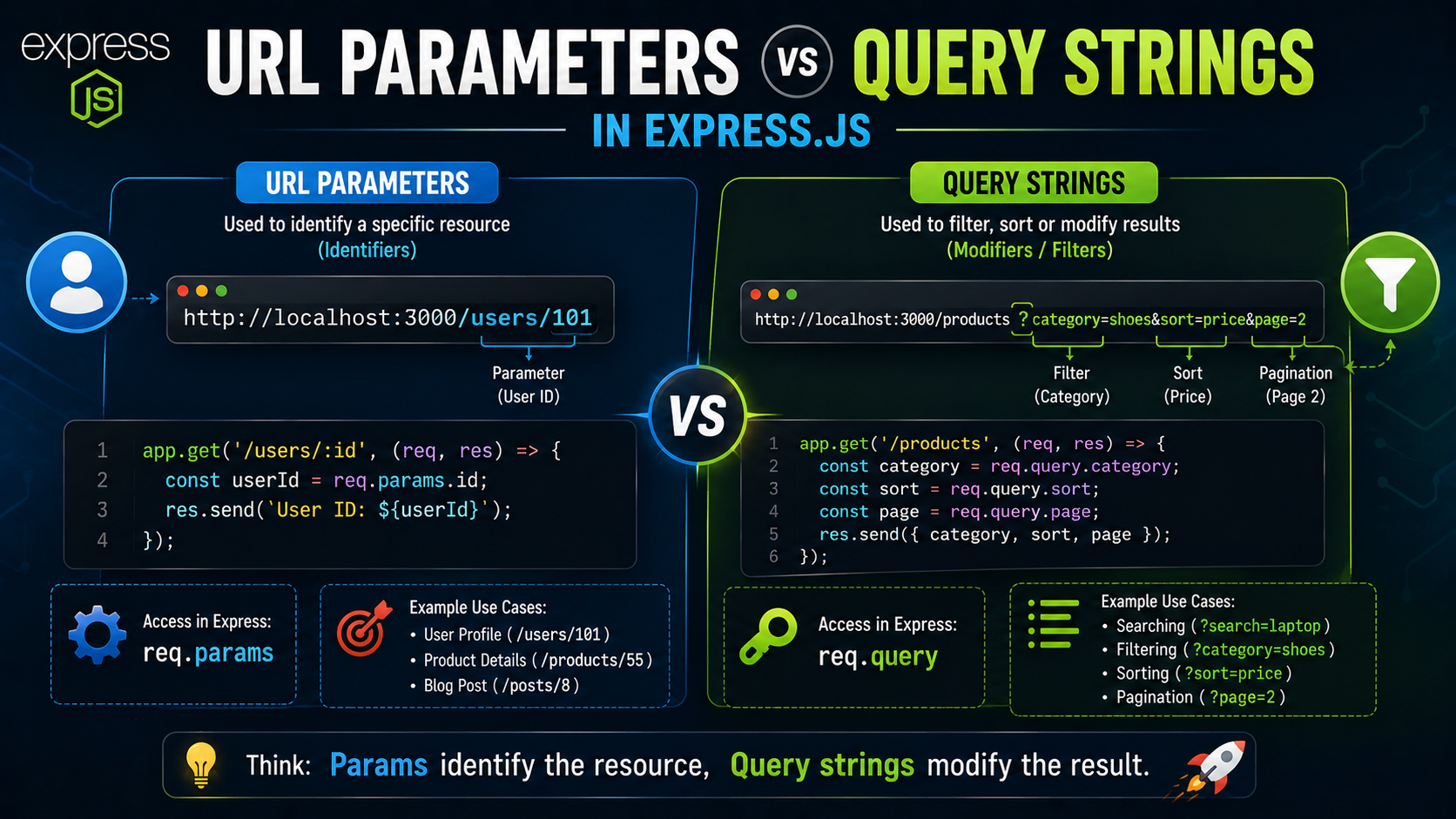
Params vs Query Comparison Diagram


Understanding the Difference Clearly
This is the most important concept.
URL Parameters
Used for:
Identifying resources
Examples:
/users/101
/products/55
/posts/8
Specific things.
Query Strings
Used for:
Filtering or modifying results
Examples:
?sort=price
?page=2
?search=phone
Extra instructions.
Real-World Example: User Profile
Example:
/users/101
Meaning:
“Show user with ID 101.”
The user ID is essential.
Without it:
Server doesn't know which user
That’s why params work best here.
Real-World Example: Product Search
Example:
/products?category=shoes&brand=nike
Meaning:
filter products
only show shoes
only Nike brand
These are optional filters.
Perfect for query strings.
Combining Params and Query Strings
Both can work together.
Example:
/users/101/posts?page=2
Here:
URL Parameter
101
identifies user.
Query String
page=2
modifies results.
Very common pattern.
Example in Express
app.get("/users/:id/posts", (req, res) => {

  const userId = req.params.id;

  const page = req.query.page;

  res.send(`User ${userId}, Page ${page}`);

});
Visit:
/users/101/posts?page=2
Output:
User 101, Page 2
Beautiful teamwork between params and query strings.
Why Query Strings Start with ?
The question mark separates:
Main URL
from:
Extra query data
Example:
/products?page=2
Everything after ? becomes query string data.
Multiple Query Parameters
Multiple query values use:
&
Example:
/products?category=phones&sort=price&page=1
Each parameter gets separated cleanly.
Common Beginner Mistake
Many beginners use query strings for IDs unnecessarily.
Example:
/user?id=101
Works technically.
But cleaner REST-style design usually prefers:
/users/101
because the ID identifies the resource directly.
Another Common Mistake
Forgetting:
req.params
and:
req.query
are different.
Very common confusion initially.
Real-Life Analogy Recap
URL Parameters
Specific identity.
Like:
"Give me pizza #12"
Query Strings
Customisations.
Like:
"Extra cheese, less spicy"
One identifies.
One modifies.
That’s the key idea.
When to Use Params vs Query
Use Params When:
identifying specific resource
value is required
route depends on it
Examples:
/users/101
/products/5
Use Query Strings When:
filtering data
sorting results
searching
pagination
optional settings
Examples:
?page=2
?sort=price
?search=nodejs
Unique Tip for Beginners
Here’s the easiest memory trick.
Params
Think:
WHO or WHAT
(resource identity)
Query Strings
Think:
HOW
(filters or modifiers)
That mental shortcut helps instantly.
Final Thoughts
URL parameters and query strings are both essential ways of sending data through URLs in Express.js.
But their purposes are very different.
At a high level:
URL parameters identify resources
Query strings modify or filter behavior
Using:
req.paramsreq.query
Express makes accessing both extremely simple.
And once you understand the difference between identification and filtering, routing logic suddenly becomes much more intuitive and easier to design properly.